If you are planning to extend the cable on a Starlink antenna, especially on a yacht, the main risk is not only losing speed. A poor extension can create voltage drop, unstable connections, corrosion points, or even damage to the Starlink router or power path.
Starlink cables are often treated as if they were ordinary Ethernet cables. They are not. In many installations they carry both data and power, so cable quality, shielding, conductor material, pinout, sealing and routing matter much more than in a simple indoor network run.
Why Starlink cable extensions fail
The most common mistakes are using low-grade indoor cable, installing unshielded connectors outdoors, leaving the shield disconnected, creating long untwisted splices, or routing the cable close to inverters, alternators, motors or AC wiring. On a yacht, salt, humidity, vibration and electrical noise make all of these problems worse.
- Random Starlink dropouts
- Reduced link stability or lower throughput
- PoE voltage drop under load
- Intermittent faults caused by vibration or corrosion
- Possible damage to connectors, router ports or power components
Recommended cable for marine Starlink installations
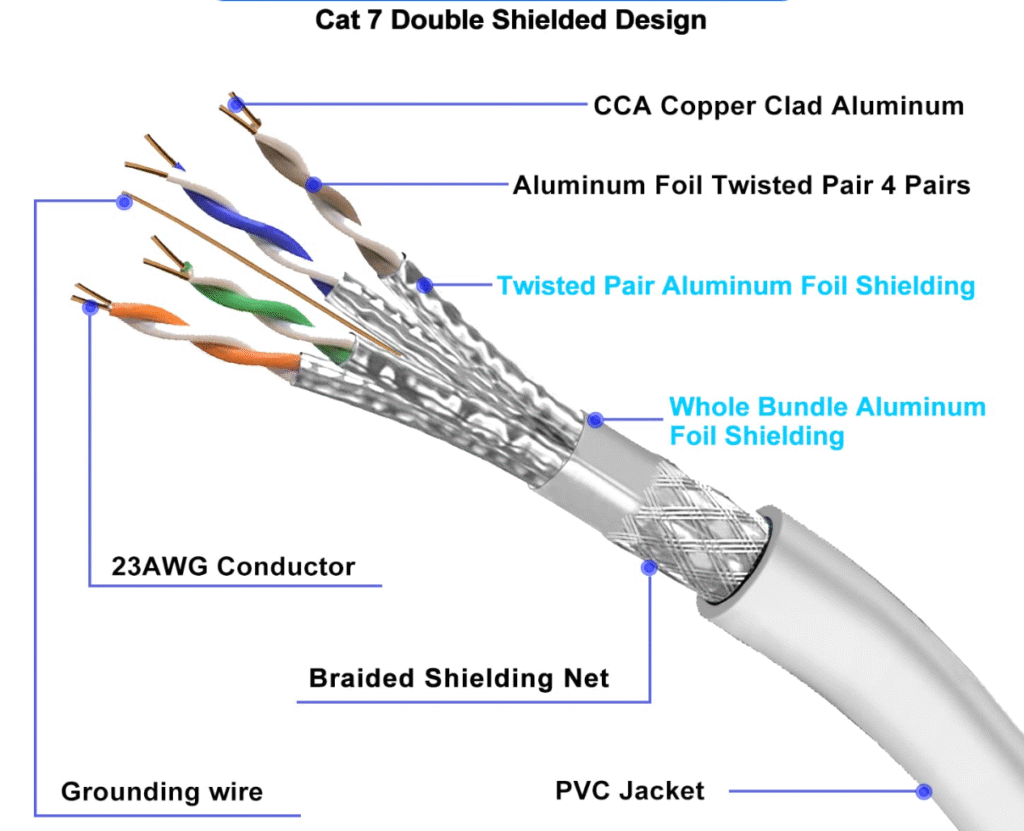
For a professional yacht installation, avoid cheap domestic UTP cable and avoid CCA conductors. The safer choice is a marine-suitable, outdoor-rated, fully shielded cable.
- Recommended type: Cat6A S/FTP Outdoor LSZH
- Conductor: solid copper, not CCA
- Shielding: individual pair shielding plus overall braid or foil
- Environment: UV-resistant, moisture-resistant and suitable for saline conditions
- Installation: protected routing, correct bend radius and sealed outdoor transitions
As a practical rule, extensions up to around 30 metres can work reliably when the cable and joints are correctly selected and installed. Beyond that, voltage drop and installation quality become increasingly critical and should be assessed case by case.
How to splice or extend the cable correctly
Intermediate RJ45 couplers are rarely the best option in exposed or technical marine spaces. A professional extension should preserve pair geometry, shielding continuity and mechanical protection.
- Make a clean cut and remove only the minimum amount of outer jacket required.
- Keep each twisted pair as close to its original twist as possible; avoid long untwisted sections.
- Join pair to pair using a suitable method such as soldering or quality IDC connectors when appropriate.
- Maintain shield continuity across the joint.
- Use adhesive-lined heat shrink and, if exposed, place the joint inside an IP-rated enclosure.
- Secure the cable mechanically so vibration is not transferred to the joint or connector.
The objective is simple: no loose contacts, no corrosion path, no shielding break and no avoidable voltage drop.
Starlink Gen 2 pinout and T568B reference
On many Starlink Gen 2 conversions, the proprietary connector can be adapted to a standard RJ45 layout using the T568B colour order. Always verify the exact hardware version before cutting or modifying cables.
1 → White/Orange
2 → Orange
3 → White/Green
4 → Blue        (PoE +)
5 → White/Blue  (PoE +)
6 → Green
7 → White/Brown (PoE −)
8 → Brown       (PoE −)
Correct pinout is essential because the cable is carrying both data and power. A wiring error can cause intermittent operation or electrical damage.
Quick cable comparison
| Cable type | Shielding | Typical use |
|---|---|---|
| Cat5e UTP | None | Basic indoor networks only |
| Cat6 UTP | None | Indoor runs with low electrical noise |
| Cat6 F/UTP | Overall foil | Moderate-noise environments |
| Cat6A S/FTP | Pair shielding + overall shield | Professional installations, PoE, yachts and outdoor runs |
| Cat7 S/FTP | High shielding | Premium installations where compatibility is managed correctly |
| Cat8 S/FTP | Very high shielding | Short data-centre-style links, usually not the best choice for long yacht runs |
If the route passes near inverters, alternators, motors, chargers or other noise sources, use S/FTP cable as a minimum and keep the cable route separated from power wiring whenever possible. For outdoor or exposed areas, use Outdoor LSZH cable designed to resist UV, moisture and harsh environments. This is an example of the type of cable to look for.
Professional recommendation
For Starlink on yachts, do not improvise with cheap cable, unprotected couplers or indoor connectors. A properly routed Cat6A S/FTP Outdoor LSZH extension, installed with correct shielding continuity and sealed against moisture, provides the best balance between speed, electrical safety and long-term reliability.
If the installation is critical, exposed to salt water, or part of a wider yacht network, the extension should be treated as a professional marine electronics job rather than a simple cable repair.